Picked with purpose.
A curated editors’ collection puts noteworthy apps in the spotlight. Less searching. More finding your next favourite.
The little screen you love still has a world to discover. Thoughtfully picked apps, everyday favourites, and a fresh reason to keep your Java phone close.
The joy of finding something good, made for a different kind of phone.
A curated editors’ collection puts noteworthy apps in the spotlight. Less searching. More finding your next favourite.
Save the apps you want to come back to. Your personal collection stays on your phone, ready for another look.
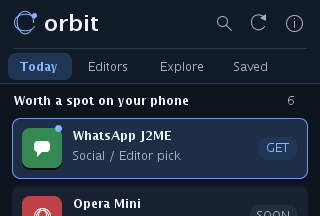
Choose Today, Editors, Explore or Saved right on the screen. Search, refresh, install and save with the keypad or a tap. Every everyday action has a place in the interface.
Start with a Java-compatible phone and an internet connection.
Download OrbitNeed the JAR directly? Get it here On an older phone? Simple install pageOpen the JAD on your phone, or transfer the JAR using your usual Java installer. Requires MIDP 2.0 and CLDC 1.1.
Orbit connects to its built-in bridge and loads the catalog automatically. No server address to enter. Allow network access when your phone asks.
Use the top selector to browse Editors and Explore, and the header buttons to search or refresh. Select Install to start your phone’s installer directly. Available apps depend on this store’s published collection.
Publish Java apps, shape the editors’ shelf, and keep classic phones going.